

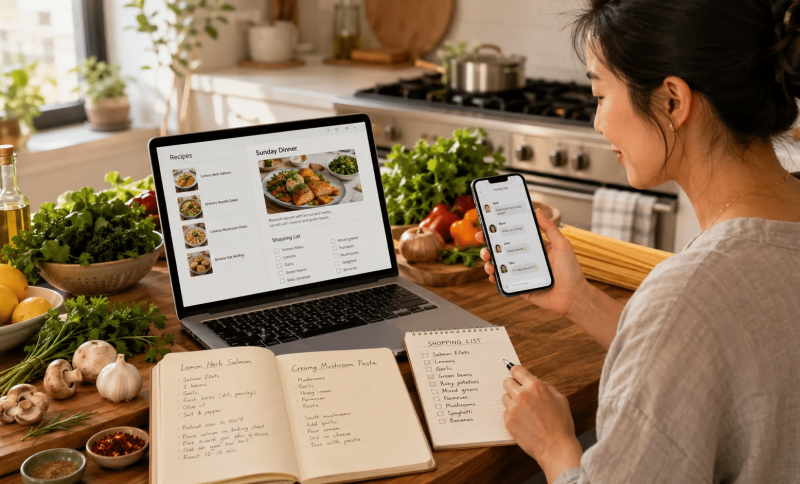
Cooking at home used to involve a recipe card, a grocery list, and perhaps a phone call to ask someone what they wanted for dinner. Today, the average kitchen can involve far more digital information.
Recipes may come from food blogs, screenshots, family messages, videos, saved PDFs, social posts, and handwritten notes. Shopping lists might live on one phone while ingredient substitutions are discussed in a group chat. For a dinner party or holiday meal, several people may be coordinating dishes, dietary preferences, shopping responsibilities, and arrival times at once.
Digital tools can make all of this easier, but only when the information is organized.
A practical digital kitchen workflow does not require a long list of apps. It simply needs clear places for conversations, recipes, shopping information, and files, along with a sensible way to move between phones and computers.
Keep Recipe Conversations in One Place
Group conversations can be extremely useful when several people are planning a meal together.
One person may suggest a pasta recipe. Someone else may point out a food allergy. Another person may volunteer to bring dessert. Photos, links, ingredient ideas, and timing questions can all be exchanged quickly.
The problem appears when those conversations are scattered across too many channels.
If recipe ideas arrive through email, text messages, social media, and several different messaging apps, it becomes difficult to remember where the final decision was made.
For recurring meal-planning groups, families, or friends who cook together regularly, choosing one primary communication channel can reduce that confusion.
The group can use it for deciding what to cook, sharing recipe links, discussing substitutions, assigning shopping responsibilities, confirming dietary restrictions, sharing photos of finished dishes, and coordinating timing for dinner.
The goal is not to move every part of meal planning into chat. It is to create one predictable place for discussion.
Make Multilingual Cooking Groups Easier to Follow
Food vocabulary becomes especially interesting in multilingual households.
A family may discuss ingredients in English while grandparents use Chinese names for the same foods. Someone may send a recipe written in Traditional Chinese, while another version of the dish appears on an English-language food blog.
That does not necessarily create a problem, but familiar interface settings can make group communication easier.
Chinese-speaking users who are trying to understand how a messaging platform works across different language environments may consult a Telegram website guide before deciding how the service fits into their everyday communication setup.
In multilingual cooking groups, the important issue is usually not which language everyone uses. It is whether each person can understand the essential information.
Ingredient names can be clarified in both languages when necessary. Quantities should be written clearly. Allergies and dietary restrictions deserve especially direct wording.
For example, instead of simply saying that someone “cannot eat nuts,” it may be more useful to specify whether the issue applies to peanuts, tree nuts, sesame, or all of them.
Digital communication works best when it reduces ambiguity rather than adding another layer to it.

Use a Computer for Longer Recipe Planning
Phones are convenient in the kitchen.
They are easy to carry to the grocery store, useful for checking ingredients while standing in front of a shelf, and quick for sending photos or short questions.
However, a phone is not always the most comfortable device for detailed meal planning.
A laptop or desktop computer can be much easier when working with several recipe tabs, long ingredient lists, meal-prep schedules, recipe PDFs, shopping spreadsheets, catering quantities, or cooking timelines.
A larger screen allows multiple pieces of information to remain visible at the same time.
For example, someone organizing a holiday meal might keep a recipe open on one side of the screen while maintaining a shopping list or group conversation on the other.
This becomes especially useful when a meal contains several dishes that need to finish at approximately the same time.
Home cooks who regularly move between phone and computer may want to understand how their communication tools work on larger screens. A Telegram desktop guide can provide additional context for users who want to understand desktop access as part of a cross-device workflow.
The broader principle is simple: use the phone when mobility matters and the computer when screen space improves the task.

Build One Shared Shopping List
Few things create unnecessary kitchen frustration faster than an incomplete or duplicated shopping trip.
A shared list can prevent several common problems.
Instead of three people independently buying onions, one person can mark them as purchased. If a recipe changes, the ingredient list can be updated before anyone reaches the store.
A useful shared shopping list should include more than ingredient names.
For larger meals, it can help to note required quantity, preferred size, acceptable substitutes, who is responsible for buying it, and whether it has already been purchased.
For example, “Heavy cream — 500 ml — Jamie — purchased” is much clearer than simply writing “cream.”
Specificity matters when several people are involved.
The same principle applies to specialty ingredients. If a recipe requires a particular rice, flour, cheese, or spice, include enough detail so that someone unfamiliar with the recipe can identify it.
Shopping lists work best when they reduce follow-up questions.
Separate Final Recipes From Casual Chat
Messaging is excellent for discussion, but it is not always ideal for permanent recipe storage.
A recipe link that was easy to find on Monday may be buried under hundreds of messages by the following month.
Once a group settles on a recipe that everyone wants to keep, it is useful to move the final version somewhere more permanent.
That could be a shared cloud folder, a recipe-management app, a notes system, a family document, a PDF archive, or a dedicated recipe folder.
Consistent file names make this even easier.
Instead of recipe-final-new2.pdf, use something like Sunday-Lasagna-Family-Version.pdf.
The same approach works for holiday menus and baking formulas.
Chats are useful for discovering and discussing recipes. Organized storage is better for finding them again.
Set Up Communication Apps Carefully on Each Device
Households increasingly use more than one type of device.
One person may use an Android phone, another an iPhone, while a shared kitchen tablet or household computer uses a different operating system entirely.
That means installing the same communication tool is not always an identical process for everyone.
Before installing any app on a new phone, tablet, or computer, users should check which operating system the device uses, whether the software version matches that platform, who the listed developer is, what permissions are being requested, and whether the installation source can be verified.
Users researching cross-platform installation may refer to a Telegram download guide for information about available device versions, while still confirming the current official distribution source before installing software.
This is particularly important on shared household devices.
A tablet sitting permanently in the kitchen may be used by several family members. A computer might contain personal documents, saved passwords, or financial information.
Adding communication software to those devices should therefore be done deliberately rather than simply installing the first file found through a search engine.

Save Important Recipes Outside the Chat
Some recipes deserve long-term preservation.
A grandmother’s dumpling filling, a holiday cake, or a family soup recipe may be shared repeatedly over many years.
Those recipes should not depend entirely on the continued existence of one conversation thread.
Keeping a separate recipe archive protects useful information from being buried or accidentally deleted.
Photos can be saved alongside recipes when visual details matter.
For example, bread recipes may benefit from photos showing dough consistency, shaping technique, proofing level, and finished crumb structure.
Likewise, handwritten family recipes can be photographed or scanned.
The digital copy does not need to replace the original. It simply creates another way to preserve and share it.
Use Notifications as Kitchen Tools, Not Distractions
Cooking already requires attention.
When something is frying, caramelizing, or approaching the end of a baking time, constant message alerts are not particularly helpful.
Notification settings can reduce unnecessary interruptions.
A family meal-planning conversation might remain active while unrelated groups are muted temporarily.
Phones and computers also commonly offer focus or quiet modes that can reduce alerts during cooking.
This becomes even more useful when the same account is connected to several devices.
One message does not need to create an alert on a phone, tablet, and computer simultaneously.
The best notification setup is the one that surfaces genuinely useful information without competing with the task happening in the kitchen.
Protect Privacy on Shared Kitchen Devices
Shared tablets and computers create convenience, but they also create privacy considerations.
A kitchen tablet may be used for recipes during the day and entertainment later. Guests, children, partners, or housemates might all have access to the same screen.
Private message previews should therefore be considered carefully.
Users may prefer notifications that show only the name of the application rather than the contents of the message.
Saved passwords deserve similar attention.
If several people use the same computer, personal accounts should not automatically remain accessible to everyone.
It is also useful to review active sessions occasionally and remove devices that are no longer in use.
An old tablet stored in a drawer does not necessarily need continued access to personal communication accounts.
Shared technology works best when convenience is balanced with basic privacy habits.
Keep Digital Meal Planning Simple
There are countless tools designed to organize food, shopping, recipes, and communication.
Using more of them does not automatically create a better system.
In fact, too many tools can recreate the same problem they were meant to solve.
A simple household might need only one place for conversation, one shared shopping list, one location for saved recipes, and one calendar for important meal dates.
Everything else can remain optional.
Before introducing another app, ask what problem it solves.
If it duplicates something the household already uses successfully, it may not be necessary.
A good digital kitchen system should become almost invisible. People should know instinctively where to look for a recipe, where to update the shopping list, and where to ask whether someone already bought the tomatoes.
Let Technology Support the Meal
Digital tools can make home cooking easier in ways that would have been difficult to imagine a generation ago.
Families can share recipes across countries, organize dinner plans from several locations, update shopping lists in real time, and keep generations of food knowledge accessible across devices.
But the technology should remain secondary to the meal itself.
The purpose of organizing recipes is to make them easier to cook. The purpose of group communication is to help people coordinate. The purpose of a shopping list is to make sure the ingredients reach the kitchen.
When those systems are kept simple, they leave more attention for what matters most: preparing food, learning from one another, sitting around the table, and enjoying the meal together.


